Best eSIM & SIM Cards for Portugal: What Travelers Need to Know
Is a SIM/eSIM right for you?
That depends on a few factors, mostly cost and how you use your service.
An international SIM allows travelers to stay connected with home, reach out to local contacts, use apps for directions, reservations, booking trains, etc for a much lower cost than most international cell phone plans.
Here you will find information as to what a SIM/eSIM is, where to buy a SIM card in Portugal, the best eSIM for Portugal, and how to install your SIM card or eSIM.
After 2 years of paying $100/month for international service with Verizon, I finally converted to eSIMs and they have saved me hundreds, if not thousands of dollars as a full-time traveler.
My typical approach to eSIMs is using whatever provider has the best prices or intro offers, but I have found a few that I prefer for Portugal specifically. You'll find those and some promo codes at the bottom of this page.

All About SIM & eSIMs for Portugal
Where to Get a SIM Card in Portugal
How to Install a SIM Card
How to Install an eSIM
More Portugal Content You May Love
📋The Perfect 3 Day Lisbon Itinerary for First-Time Visitors
📋The Perfect 3-Day Itinerary for Porto, Portugal
🛬How to Get from Lisbon Airport to the City Center: Cheapest, Fastest & Easiest Options
📍Where to Stay in Lisbon: Best Neighborhoods & Hotel Recommendations
🚃Complete Guide to Lisbon Transportation: Getting Around the City
🍸Cocktail Lovers’ Guide to the Best Cocktails in Lisbon
🛍️Essential Souvenirs from Lisbon: Your Ultimate Shopping Guide
What Are the Benefits of a Travel SIM?
Cost
The biggest benefit to a travel SIM is cost savings. I have paid the same for a month of data as I have for one day of service with my home phone provider.
Depending on how much data you use and the duration of your trip, a SIM data package can be as little as a few dollars.
Connectivity
A travel SIM or eSIM allows travelers to stay connected to friends and family back home, as well as contact your accommodations, make reservations, request an Uber/Bolt, use Google Maps, etc.
⭐Most SIMs/eSIMs are data only. Data plans allow you to communicate via IG or Facebook messenger, WhatsApp, imessage, etc, but does not include mobile calling unless a mobile calling plan is added.
eSIM Versus SIM Card
Is it better to get a SIM card or eSIM?
This really depends on a few factors. An immediate deciding factor between an eSIM and SIM card is your phone itself. Some newer phones don’t have physical SIM ports and others are not eSIM compatible.
Phones may not be eSIM compatible if: they are older model phones, new phones under a new plan or contract, limited due to phone plan or contract. Always be sure to check with your provider and plan if your phone is eSIM compatible before travel.
Some newer phones do not have SIM ports, making eSIMs the only option.
⭐Always be sue to check your phone and network’s SIM/eSIM compatibility prior to travel. Many US providers will “lock” new phones for an initial period, which makes them incompatible with using a SIM.
Verizon phones and eSIMs are automatically unlocked after 60 days of purchase, or immediately once a device purchased at full retail price or on a payment plan is fully paid off.
Boost Mobile: If you bought your new phone directly from Boost Mobile, the device is typically locked to Boost's network for a 12-month policy period before it can be unlocked for other carriers
AT&T device must be active on AT&T for at least 60 days (or 12 months for AT&T Prepaid)
What is a SIM Card?
A SIM card is a small removeable plastic card with a microchip that connect your mobile device to a cellular network.
Benefits to a SIM Card
If you purchase a SIM card on arrival, you have the benefit of someone installing it for you and walking you through how to use your plan. You also have the advantage of brick-and-mortar stores to walk in to in the event you have any issues with your service or figuring out how to use your SIM
Where to Get a SIM Card?
There are many options for ordering a physical SIM card online, with several available on Amazon. You can pre-purchase a travel SIM then install it upon landing.
Where to get a SIM card in Portugal
The most convenient place to get a SIM card in Portugal is at the airport on arrival. There is a Vodafone kiosk, in Lisbon (Terminal 1 arrivals hall), Porto and Madeira airports. You will also find Vodafone stores in towns and cities throughout Portugal.
Upon arrival, you will also see several kiosks and exchange booths that offer SIM and eSIM plans and packages. Unicambio or "The Exchange” offers competitively priced SIM cards (typically Lycamobile).
Travelers can also obtain SIM cards at Vodafone and various electronics stores in city centers. Here is where you can find Vodafone stores in major cities in Portugal:
Lisbon (Rossio): Praça Dom Pedro IV Nº4 e 5
Lisbon (Parque das Nações): Alameda dos Oceanos 47
Lisbon (Centro Comercial Vasco da Gama): Avenida Dom João II
Lisbon Airport: Arrival and terminal shopping areas
Porto Airport (Aeroporto Francisco Sá Carneiro): Arrivals hall for travel SIM cards and accessories
You can also use this Vodafone Store Locator to find locations near you.
How to Install a SIM card?
Installing a physical SIM card is easy and straight forward. If you have a single SIM phone (most do), simply remove your current SIM card and replace it with your temporary travel SIM card.
*Be sure to keep your SIM card in a safe place! They are tiny and easy to lose.
If your phone has a dual eSIM, simply insert your travel SIM in the second slot and toggle on to that SIM in your cellular settings.
Once your new SIM card is installed, follow the included instructions and prompts in your cellular settings.
What is an eSIM?
An eSIM (embedded Subscriber Identity Module) is a digital SIM card built directly into a phone, tablet, or smartwatch that connects you to a mobile network without a physical plastic card.
How to Install an eSIM
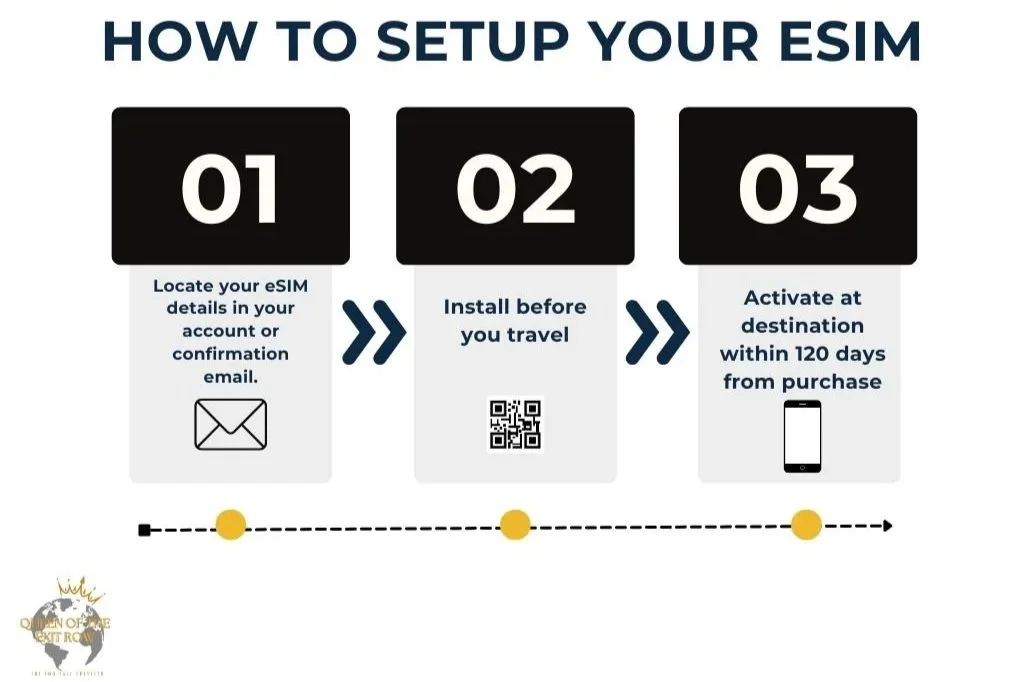
How to Install an eSIM via QR Code
After purchasing you eSIM via the website or app, you will be emailed a QR code, as well as manual instructions for installing your eSIM.
While the installation process may vary slightly from each provider, the process will always follow these steps:
How to Install an eSIM on an Android:
Open 'Settings', tap on 'Connections'
From the 'Connections' tap on 'SIM Manager' and select 'SIM Manager'
Select 'Add eSIM'
Scan QR code
Select 'Add' to install your eSIM.
Note: You need a stable internet connection, and you might require another phone or device to scan your QR code from.
Click on ‘Download’ to add the eSIM to your phone.
Congratulations! Your Vodafone eSIM is successfully installed now. Please follow the instructions on the Activation journey in order to activate your plan.
Open the 'Settings' on your device.
Tap on 'Connections'.
Select 'SIM Manager'
Tap on eSIM and rename it with your desired label. We recommend using a descriptive format (ie: Vodafone Travel).
To activate your new eSIM, tap on 'Mobile data' and select 'eSIM'
Before using your eSIM abroad, ensure that the 'data roaming' service is switched on. Follow these steps:
a) Click on 'Connections' and tap on 'Mobile networks'
b) Verify 'Data roaming' option is turned on
Please note that certain Android phones may require adjustments to their APN settings to ensure seamless eSIM functionality.
To make these changes, follow these steps: a) Go to Settings, tap 'Mobile networks' and tap on 'Access Point Names' b) Go to eSIM tab c) Select
How to Install an eSIM on an iphone:
Option 1: Open 'Settings', tap on 'Mobile data’.
Option 2: Alternatively, use your camera to scan the QR code directly.
*With most providers, you can also hold down the QR code in the email on your phone, so you don’t need to use your phone camera and another device.
From the 'Mobile data' settings, select 'Add eSIM.'
Click on 'Use QR Code' and scan the QR code received after purchase.
Scan the QR code.
Make sure to have a stable internet connection for eSIM download & installation
Note: You may require another device to display the QR code for scanning.
Click on 'Continue' to add the eSIM to your phone.
Note: This step may take a couple of minutes. If you close the installation screen, you can check the installation status of your new eSIM under Settings – Mobile Service - SIMs.
Congratulations! Your eSIM is successfully installed now.
How to Install an eSIM Manually
On occasion, manual installation is needed. This can also be needed if you don’t have a second device to display the QR code or the QR code doesn’t open the link by holding it down.
Manual entry of an eSIM is simple following the prompts on your phone and/or following these steps:
On an Android
On an iphone
Open 'Settings', tap on 'Mobile data.'
From the 'Mobile data' settings, select 'Add eSIM.'
Click on 'Enter details manually.'
Input the codes received in your email or in your account.’
Click on 'Continue' to add the eSIM to your phone.
Note: This step may take a couple of minutes. If you close the installation screen, you can check the installation status of your new eSIM under Settings – Mobile Service - SIMs.
Congratulations! Your eSIM is successfully installed now.
Open 'Settings', tap on 'Connections'
From the 'Connections' tap on 'SIM Manager' and select 'SIM Manager'
Select 'Add eSIM'
Click on 'Next’ to manually install the codes received after purchase.
Click on 'Need help?' to go into the manual entry page
Click on 'Enter it manually'
Input the codes received in your email or in your account.
Click on 'Download' to add the eSIM to your phone.
Congratulations! Your eSIM is successfully installed now.
How Much Data Do You Need?
This will vary by how much you use your data plan and what you use it for.
I am heavily reliant on google maps, am constantly posting on social media, love listening to music, am always in the group chat, and am guilty of doom scrolling on long transit rides so I always just go with the most data that fits a comfortable price point, so I don’t need to think about it. This usually means for a week to 2-week trip, I purchase 10GB of data, and for a 2 week to 30-day trip I purchase 20GB and this usually lasts the whole trip.
Most plans offer varying amounts of data for specific times (ie: 1GB for 7 days, 3GB-20GB for 30 Days). The expiry of the plan is either when all of the data is used, or the duration has elapsed - whichever comes first.
Some SIM/eSIM plans offer unlimited data for a selected period of time. This is a more expensive option but allows users to not have to worry about data limits or having to top up during your trip. This is a great option for travelers who are heavy data users, or want to use their phone as a hotspot. *Pro tip: If you are traveling together with someone else, one person can purchase an unlimited SIM and the other can connect to their hotspot for data.
You can see how much data you use on a regular basis right in your phone settings, this will help give a gauge of how much data you are using and may need for your trip.
To check your data usage:
The easiest way to determine how much data you need is to dive into your daily internet activities and see where you spend most of your GBs.
Here's where to look on an iPhone:
Go to Settings > Cellular or Settings > Mobile Service/Data.
Scroll down to see app consumption.
And where to look on an Android device:
Go to Settings > Connections > Data Usage.
Tap Mobile Data Usage.
Scroll down to see app consumption.
You can also use the chart below to assess how much data to buy based on how you use your devices.
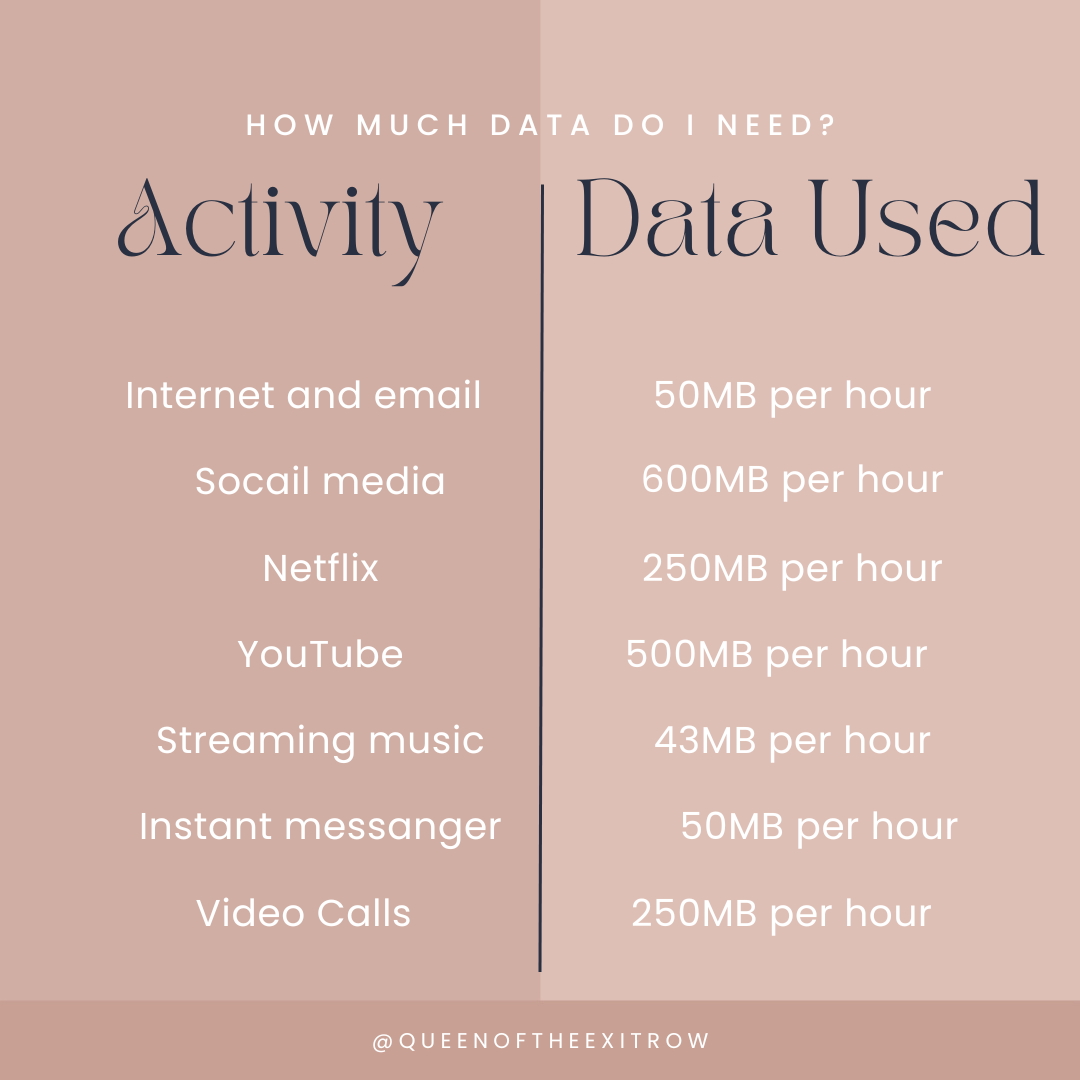
You can always check your data balance or set up alerts to track if you need more data, and top up. No need to get a new eSIM or go through the installation process all over again.
Ways to Maximize Your SIM/eSIM Data Plan
You can extend the life of your SIM by practicing a few very simple steps:
Connecting to Wi-Fi whenever available (*When connecting to an unsecure network, be sure to have a VPN enabled)
Turn on airplane mode when connected to Wi-Fi and/or when not using data. This assures nothing running in the background is using your data
Be sure to fully close you apps and browsers when not in use
What is the Best SIM/eSIM for Portugal
I have used numerous eSIMs in Portugal and can honestly say they all work! I have not seen a noticeable difference in the service between providers I have used in Portugal, and typically just go by cost and ease of interface.
Here is an overview of the eSIMs I have used in Lisbon and why they are a good option for your trip to Portugal.
I have also included referral links and discount codes (always appreciate the support!) but if you don’t want to support your favorite travel blogger, you can find introductory offers and discount codes by just Googling.
My site and all of its travel information are always free, and your support through affiliate links helps me keep it that way. Thank you for supporting my travels and my little corner of the internet!
I have also used all of these options outside of Portugal and find them all reliable and easy to use.
Virgin Roam Connect
This has become my favorite travel eSIM! I really like the interface on the website and the app, the pricing is great, and they provide frequent updates regarding data usage.
I also find this eSIM easy to install, by just holding down the QR code that is emailed to me.
👨👩👧👦 Virgin Roam Connect offers group plans that can be shared across 5 people - perfect for couples, friends and families traveling together.
🌎If you are traveling to more than one country, this Virgin Roam Connect is a great option, as it will allow you to add a new data plan to your existing eSIM for many countries.
Save 25% on your first eSIM from Virgin Connect Roam using my referral link here!
Vodafone
Vodafone is a preferred SIM provider (both physical SIM card and eSIM) for Portugal by travelers who like to have a brick-and-mortar option nearby in the event there are issues with their service while traveling.
While you can get a Vodafone eSIM in advance via the website, some travelers prefer to have the support of in-person customer service help walk them through the installation process.
Airala
Airala has long been one of the most popular eSIMs for international travel and is widely regarded as one of the best service providers.
I have successfully and seamlessly used Airala eSIMs throughout my travels and found it reliable and easy to use with good customer support.
📱Airala offers both data only and call/text plans (this will give you a local phone number).
🌎This popular eSIM also offers regional plans to cover numerous countries within Europe. If you are traveling to numerous countries and don’t want to have to purchase/install a new eSIM each time, this is a good option.
For $3.00 off your first Airola eSIM, use my code: HILLAR4036
Nomad eSIM
I used Nomad on a recent trip to Portugal thanks to a friend’s referral code and found it worked flawlessly. Even on day trips to more remote areas, I had perfect service.
Nomad can be a bit pricier than some other plans, but a referral or promo code makes it’s pricing competitive.
🌎Nomad eSIMs offers regional plans to cover numerous countries within Europe. If you are traveling to numerous countries and don’t want to have to purchase/install a new eSIM each time, this is a good option.
Save $5 on your first Nomad eSIM with code CSQHFSHPGJWU
Holofy
Like Airalo, Holafly is a very well-known and trusted eSIM used by many travelers.
Holafly exclusively offers unlimited data plans, at competitive prices. This is the best eSIM for heavy data users who don’t want to spend a mint on data. This is also an ideal plan for travelers taking road trips, digital nomads, long term travelers, or just anyone looking to stay connected without interruption.
Now that your SIM/eSIM is installed and set up, you are ready to hit the ground running on your visit to Portugal!
Staying connected offers the reassurance of being able to reach friends and family back home, knowing you have access to maps and other navigation to help you find your way around, access to important emails and bookings/reservations.
Whether you opt for an eSIM or SIM card, having a data plan (for a fraction of the cost of an international plan), you will have the freedom and flexibility to be connected without having to seek out wifi or worry about unexpected cell phone bills when you get home.

I came to Portugal 4 years ago & fell in love.
Since then, I spend half the year in Portugal, exploring the country like both a local & a curious traveler—sharing insights on popular spots, gems, & where to eat, wander, & soak in the magic of everyday Portuguese life.
Follow all of my adventures on Instagram & Facebook!